Installation
To install Yates QGIS Plugins the plugin repository must be added to the QGIS list of repositories. This repository will require valid credentials to access; ensure that you have the correct credentials added to the QGIS authentication system.
Yates credentials must be added using Basic Auth. Be sure to name the configuration appropriately.
With the credentials added to the authentication system, navigate to Plugins -> Manage and Install Plugins > Settings from the task bar to view the connected repositories.
Click the + button and add the repository https://qgsplugins.yesrus.com/plugins/repo to the list of repositories, selecting the aforementioned authentication configuration to connect securely.
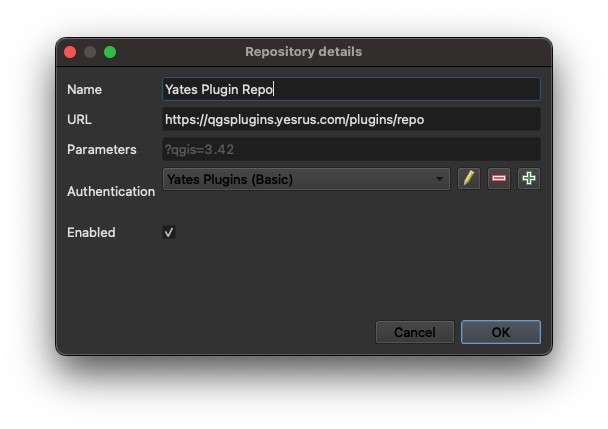
When adding the URL, be sure the URL is
httpsand nothttp
Once complete, you will be able to access all plugins available to your user account.
To install a plugin navigate to the All section of the Plugins Management dialog
and search for a plugin.